John (Caner) Kuru
7 min read
7 min read
In depth look at React Query's usequery and usemutation API
When it comes to managing API calls, React Query — or TanStack Query as it’s also known — stands out as a remarkable innovation. This library, in my view, is truly ahead of its time and it’s become a central part of my toolbox for any future projects involving API calls. I’ve spent a considerable amount of time exploring useQuery, useMutation, and useInfiniteQuery, among other features. However, for today’s discussion, we’re narrowing our focus to explore in depth the two critical hooks offered by this library: useQuery and useMutation.
Heads up! This documentation is tailored for TanStack Query v4. The developers have recently released TanStack Query v5. Explore the new version here: https://tanstack.com/query/v5/docs/react/reference/useQuery
In an earlier blog post, I embarked on a detailed exploration to distinguish between the return properties from the library — isLoading, isFetching, and isRefetching. If you find yourself still grappling with these concepts, I highly recommend revisiting that post for a refresher. You can access it here: isLoading vs isFetching.
Let's start with installing the library into our project via npm, yarn or pnpm:
$ npm install @tanstack/react-query
Then we need to create our client and wrap our application with QueryClientProvider:
Step 1: Create a client.js file and import QueryClient in it.
import { QueryClient } from "@tanstack/react-query";

export const queryClient = new QueryClient({
defaultOptions: {
 queries: {
 staleTime: 1000 _ 60 _ 5, // 5 minutes
 cacheTime: 1000 _ 60 _ 5, // 5 minutes
    },
  },
});
staleTime: This means that for 5 minutes after fetching the data, React Query considers the data ‘fresh’ and won’t go out to fetch it again.cacheTime: If you haven’t used certain data for 5 minutes, React Query will ‘throw it out’ from the cache. But don’t worry, it doesn’t affect your display. If you need that data again later, React Query will go out and fetch a fresh data.Step 2**: Import our client in to App component and wrap our application with QueryClientProvider.**
import { QueryClientProvider } from '@tanstack/react-query';
import { Home } from './Home';
import { queryClient } from './client';

function App() {
return (

<QueryClientProvider client={queryClient}>
  <Home />
</QueryClientProvider>
); }

export default App;
Now we are ready to bring in useQuery and useMutation to manage our API calls and responses.
Leveraging useQuery for my “GET” API requests allows me to utilize the response across different components, without necessitating additional API calls (while the provided stale time remains valid).
Step 1: Create useFetchRandomName.jsx file and our useFetchRandomName hook.
import { useQuery } from '@tanstack/react-query';

export const useFetchRandomName = () => {
  const endpoint = 'https://random-data-api.com/api/name/random_name';

const fetcher = async () => {
console.log('fetching');
const response = await fetch(endpoint, {
method: 'GET',
});
const data = await response.json();
return data;
};

const result = useQuery({
queryKey: ['randomName'],
queryFn: async () => await fetcher(),
retry: 0,
onSuccess: (response) => {
console.log('response', response);
},
});

return result;
};
queryKey : It's a unique identifier for the query. Here we use ["randomName"] as our key.queryFn: It's the function to execute to get the data. We use our fetcher function for this.retry : This is a configuration option in React Query that specifies the number of times a failed query will automatically retry before it stops and moves to the “error” state.onSuccess: The “onSuccess” callback is a function that will be called after a successful query execution. (The _onSuccess_ callback will be removed from the _useQuery_ hook in the upcoming version 5.)Step 2: Create Home component and import our fetch hook
import { useFetchRandomName } from './useFetchRandomName';

export const Home = ({ children }) => {
  const { data, isLoading } = useFetchRandomName();

if (isLoading) {
return <div>Loading...</div>;
}
console.log('DATA IN HOME', data);
return <>{children}</>;
};
When the Home component is displayed on the page, it starts fetching the data. While the data is being fetched, isLoading is true, and so the component displays "Loading..." on the screen.
Step 3: Create RandomName component and import our fetch hook again.
Since the data remains cached for a period of 5 minutes, the fetcher function won’t be invoked again. Instead, the cached data will be served. (This behavior bears a similarity to how Redux operates.)
import { useFetchRandomName } from './useFetchRandomName';

export const RandomName = () => {
  const { data } = useFetchRandomName();

console.log('DATA IN RANDOM NAME', data);

return <div>{data?.first_name}</div>;
};
Step 4: Let's bring them all together
import { QueryClient, QueryClientProvider } from '@tanstack/react-query';
import { Home } from './Home';
import { RandomName } from './RandomName';
import { queryClient } from './client';

function App() {
return (

<QueryClientProvider client={queryClient}>
  <Home>
    <RandomName />
  </Home>
</QueryClientProvider>
); }

export default App;
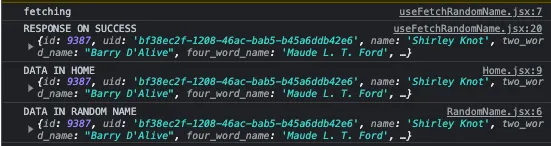
Console Preview:
As you can see in the above screenshot, the data fetching operation is executed only once, yet we can conveniently use the fetched data in both the Home and RandomName components.
I primarily utilize useMutation for API calls that involve “POST”, “PUT”, and “DELETE” methods. What I truly find admirable about it are the parameters we input into the object such as onSuccess, onMutate, and onError. These three properties equip me with the capability to perform any action at my discretion, whenever necessary.
Step 1: Create usePostRandomName.jsx and our usePostRandomName hook
import { useMutation } from '@tanstack/react-query';
import { queryClient } from './client';

export const usePostRandomName = () => {
  const endpoint = '/api/randomName'; // Replace the endpoint with your own API endpoint

const postRandomName = async () => {
console.log('posting');
const response = await fetch(endpoint, {
method: 'POST',
});
const data = await response.json();
return data;
};

const result = useMutation({
mutationKey: ['postRandomName'],
mutationFn: async () => await postRandomName(),
retry: 0,
onSuccess: (response) => {
queryClient.invalidateQueries(['randomName']);
},
onMutate: (name) => {},
onError: (error) => {},
});

return result;
};
mutationKey: This is an identifier for the mutation. It doesn't affect the mutation's behavior, but it's useful for debugging and for querying the mutation's status.mutationFn: This is the function that actually performs the mutation. In this case, it's a function that calls updateUserName with the provided name.onSuccess: This function is called after the mutation successfully completes. In this case, it logs a message, invalidates any queries with the key "randomName", and updates the cached data for updateUserName with the mutation's response. Invalidating the "randomName" query forces TanStack Query to re-fetch this data, ensuring that the application's state reflects the latest server-side state.onMutate: This function is called just before the mutation occurs. Here, it simply logs the name that will be updated.onError: This function is called if the mutation fails. Here, it logs the encountered error.Step 2: Create Home component and import our fetch hook
import { usePostRandomName } from './usePostRandomName';

export const Home = ({ children }) => {
  const { mutate } = usePostRandomName();

const handleUpdate = () => {
mutate('John Doe');
};

return (

<div>
  <button onClick={handleUpdate}>Update me</button>
</div>
); };
Step 3: Let’s bring them all together
import { QueryClient, QueryClientProvider } from '@tanstack/react-query';
import { Home } from './Home';
import { queryClient } from './client';

function App() {
return (

<QueryClientProvider client={queryClient}>
  <Home />
</QueryClientProvider>
); }

export default App;
In my experience as a React developer, TanStack Query has proven to be the most powerful tool I’ve encountered to date. It provides comprehensive capabilities for data fetching, posting, updating, and more. Although the official documentation on their website is thorough, finding specific functionalities may take some time. However, once you familiarize yourself with its workings, I can assure you that it will become an essential part of your future projects.
Please feel free to share any queries or insights, or to highlight any impressive features of this library that I may have overlooked.
I kindly invite you to express your support through clapping. This simple gesture allows me to gauge how many individuals I’ve had the privilege to assist. Many thanks to you all!